Free online photo editor that runs in your browser
Photoyam is a Photoshop-style image editor with layers, masks and selections, plus quick one-click tools for everyday jobs. Everything happens on your own device: no upload, no account, no watermark and nothing to install.
Your photos never leave your device.
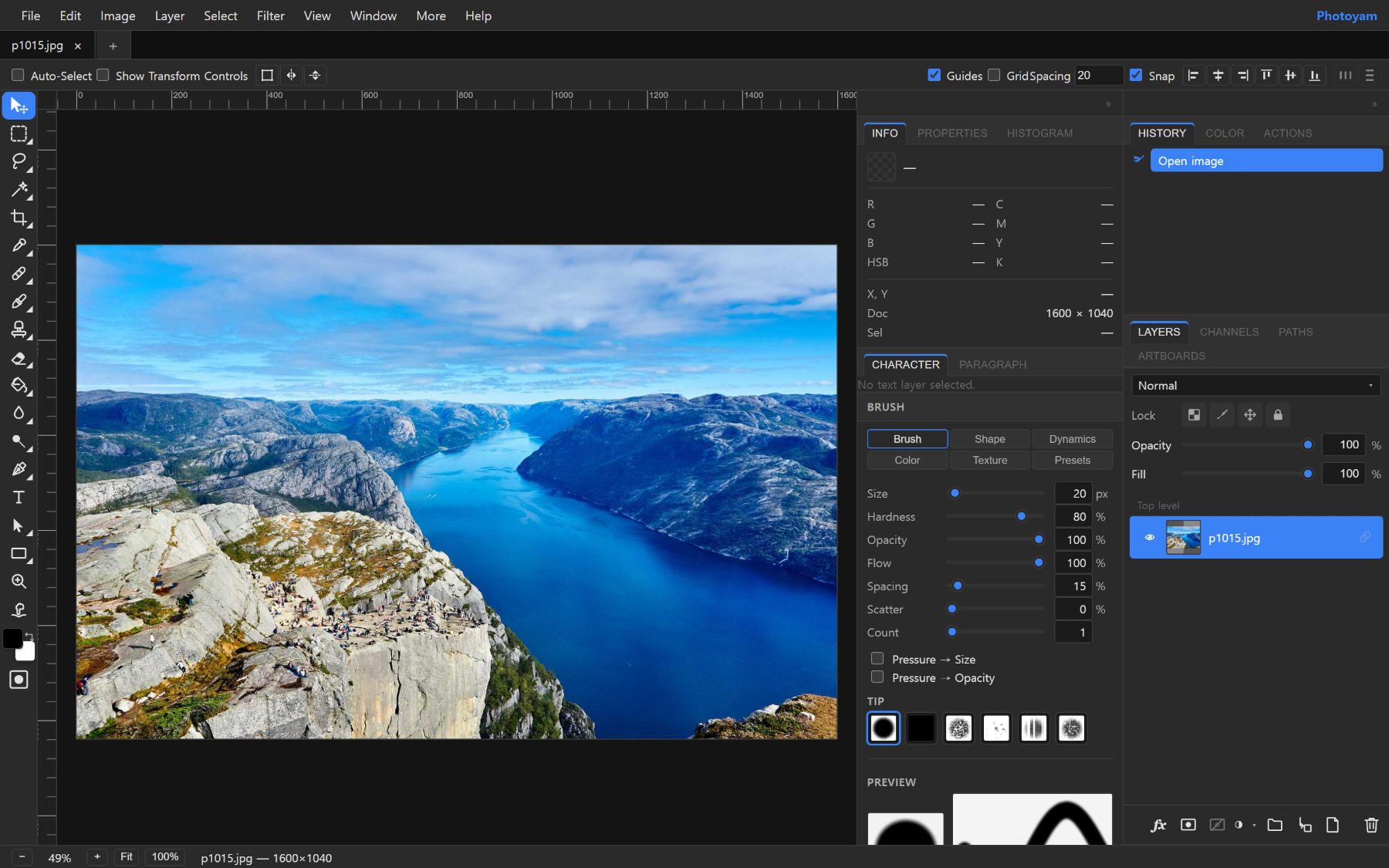
A real layered editor, not a filter app
Photoyam works the way desktop editors do, so you can make careful, reversible edits instead of stacking one-shot effects.
-
Layers, masks and blend modesStack as many layers as you need, group them, set opacity and blend modes, and paint non-destructive masks you can refine later.
-
Precise selectionsMarquee and lasso tools, Magic Wand, Quick Selection and the Pen tool for clean paths, with feathering, Refine Edge and saved selections.
-
Brushes and retouchingBrushes with size, hardness and dynamics, plus the Clone Stamp, Healing Brush, Spot Healing, Dodge, Burn and Sponge.
-
Camera Raw and adjustment layersExposure, white balance, highlights, shadows and clarity, plus Curves, Levels, Hue/Saturation and Gradient Map as editable layers.
-
Content-Aware Fill and filtersRemove unwanted objects, then apply blur, sharpen, noise and stylize filters, including smart filters on smart objects.
-
PSD in, PSD outOpen Photoshop files with their layers, groups and masks and save back to PSD. TIFF, GIF, SVG and many camera RAW formats open too.
Reshape with Free Transform, Perspective, Warp, Puppet Warp and Liquify, add editable text and vector shapes, then export to PNG, JPG or WebP. If you already know Photoshop, the menus, tools and keyboard shortcuts will feel familiar. Open the editor and start with a blank canvas or your own photo.
One-click tools for everyday jobs
When you only need one quick task done, each tool has its own page: pick a file, get the result, done.
Edit a photo
Cut out a subject, fix framing or hide private details in a couple of clicks.
Convert and compress
Change formats one file or a whole batch at a time, and shrink files for email and the web.
Work with PDFs
Combine, split and tidy PDF documents without sending them to anyone else's server.
Inspect and open
Sample exact colors from an image, or look inside a Photoshop file without Photoshop.
Private by design
There is no server doing the editing. Photoyam loads once, then every operation runs in your browser on your own processor and graphics card.
No uploads, ever
From a brush stroke to AI background removal, your images are processed locally and are never sent anywhere. That makes Photoyam a safe choice for ID scans, contracts, client work and family photos.
Autosaved as you work
Work in progress is kept in your browser's own storage, so closing a tab by accident does not lose your edits. Nothing is stored in the cloud.
Works offline, installable
Install Photoyam from your browser and it opens like a desktop app, straight into the editor, and keeps working without an internet connection.
Because the files never travel over the network, there is also no upload size limit: the only limit is your device's memory. Read exactly what is and isn't collected in our privacy policy.
Who Photoyam is for
Photoyam is for anyone who needs real editing power without buying or installing software: photographers touching up shots on a borrowed laptop, students and teachers on school Chromebooks, online sellers preparing product photos with clean white backgrounds, and social media managers resizing one image for every platform.
It is also handy for designers who receive a PSD and just need to check a layer, and for office work such as blurring an account number in a screenshot or merging scanned pages into a single PDF before sending it.
Learn with step-by-step guides
Plain-language articles that explain what is happening to your image and how to get a good result.
- BasicsLayers and layer masks explained
- FormatsJPG vs PNG vs WebP vs AVIF vs HEIC
- FormatsCompress images without losing quality
- Crop & resizeHow to crop photos well
- RetouchingRemove the background from a photo
- Color & toneLevels and Curves explained
- Practical projectsMake clean product photos for a store
- PDFsMerge, split and compress PDFs
Frequently asked questions
Is Photoyam really free?
Yes. The full editor and every tool are free to use, with no account, no trial and no watermark on your exports. The site is supported by ads on its content pages.
Are my photos uploaded to a server?
No. Files are opened and processed inside your browser tab on your own device. Photoyam has no editing server, so your images never leave your computer or phone.
Can I open and save Photoshop PSD files?
Yes. PSD files open with their layers, groups and masks, and you can save your work back to PSD or export it as PNG, JPG or WebP.
Does Photoyam work on phones, tablets and Chromebooks?
Yes. It runs in any modern browser, including Chrome, Edge, Safari and Firefox, with touch support. A larger screen is more comfortable for detailed editing.
Does it work offline?
Once the editor has loaded, you can install Photoyam as an app from your browser. The installed app opens straight into the editor and keeps working without an internet connection.
Ready to edit?
Open the editor in this tab. There is nothing to download and nothing to sign up for.