Turn a GIF into an MP4 video
Render an animated GIF as a real video file, MP4 or WebM, for platforms and editors that don't accept GIFs. Keep the original timing or choose a frame rate, and download the result from this tab.
Rendered in three steps
- 1
Open your GIF
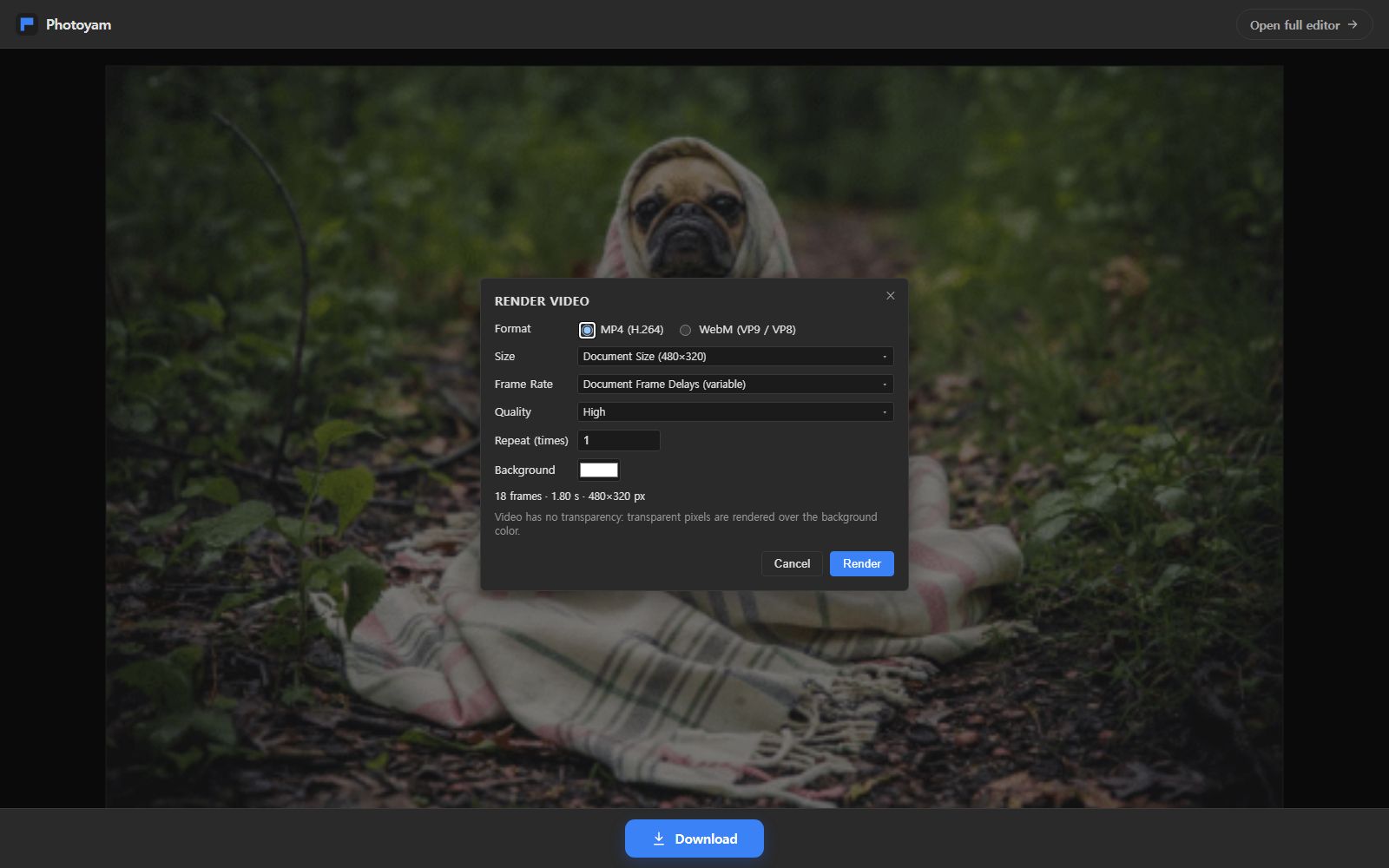
Choose an animated GIF or drop it on the page. Its frames open in a focused view of the Photoyam editor and the Render Video dialog appears.
- 2
Pick format and timing
Choose MP4 or WebM, the size, the frame rate, the quality and how many times the animation repeats. The summary shows the frame count, length and pixel size.
- 3
Render and download
Press Render. Each frame is encoded in your browser and the finished video downloads with the GIF's name and a .mp4 or .webm extension.
Why convert a GIF to video
GIF is a 1980s image format. It stores each frame with at most 256 colors and compresses it on its own, using a method designed for flat graphics, not photos. Modern video codecs such as H.264 (in MP4) and VP9 (in WebM) instead describe most frames as small changes to the frames around them and keep full color. For photographic or screen-recorded animation, the video version is therefore usually much smaller and smoother than the same content as a GIF.
Some places also simply don't take GIFs: video-only upload forms, presentation and editing apps that import clips, or social platforms that convert GIFs on upload anyway. Rendering the video yourself lets you choose the size and quality instead of leaving it to someone else's converter.
The conversion keeps your frames as they are. Photoyam composites each GIF frame at full quality, then encodes the sequence with the browser's own video encoder (WebCodecs). If WebCodecs can't write the format but the browser can record a canvas, it falls back to real-time recording with MediaRecorder, in which case rendering takes as long as the video plays.
The Render Video settings
| Setting | Choices | Notes |
|---|---|---|
| Format | MP4 (H.264), WebM (VP9 / VP8) | A format this browser can't encode is disabled with the reason. |
| Size | Document Size or Custom, 2 to 8,192 px | Constrain Proportions keeps the aspect; odd sizes are rounded down to even numbers, which video needs. |
| Frame Rate | Document Frame Delays (variable), or 12, 15, 24, 25, 30 or 60 fps | Variable keeps each GIF delay exactly; a fixed rate resamples the frames onto a steady clock. |
| Quality | Low, Medium, High, Maximum | Sets the target bitrate for the chosen size and frame rate. |
| Repeat (times) | 1 to 100 | Video has no loop flag, so the animation is repeated inside the file. |
| Background | Any color (white by default) | Video has no transparency; clear GIF pixels are filled with this color. |
MP4 is the safer choice for sharing: it plays almost everywhere. WebM is a good choice for web pages and is the one to use in browsers that offer no H.264 encoder, such as Firefox. Older Safari versions, on the other hand, may not be able to write WebM.
Your GIF never leaves your device
Decoding the GIF and encoding the video both happen in this browser tab with the browser's built-in encoders. Photoyam has no server to upload to, so the file stays yours.
Questions & answers
Will the video play at the same speed as the GIF?
Yes, with the default Document Frame Delays (variable) setting each frame lasts exactly as long as in the GIF. Choosing a fixed frame rate such as 30 fps resamples the animation onto that clock, so the total length stays the same while individual frames may last one tick more or less.
Why is MP4 not available in my browser?
Encoding MP4 needs an H.264 encoder, which some browsers, such as Firefox, don't provide to web pages. The dialog disables the option and explains why. Choose WebM there, or render the MP4 in a browser that has an H.264 encoder, such as Chrome or Edge.
Does the video loop like the GIF?
MP4 and WebM files have no loop setting; looping is up to the player or the page that shows them. If you need the animation to run several times in one file, set Repeat (times) and the sequence is written that many times.
What happens to transparent parts of my GIF?
Video has no transparency, so transparent pixels are rendered over the Background color you pick. White is the default; choose black or a brand color to match where the video will appear.
Why was my width changed by one pixel?
H.264 video stores color at half resolution, so the width and height must be even numbers. Photoyam rounds an odd dimension down by one pixel and tells you the size it will render at.
Is there a length or size limit?
No fixed limit. Frames are rendered one at a time, but the GIF's own frames are held in memory as layers. Very long GIFs at large sizes can take a while; on the real-time fallback, rendering takes as long as the video plays.
When a video beats a GIF
- Uploading to video-only places: course platforms, slideshow tools and many upload forms accept MP4 but not GIF.
- Faster web pages: a short muted, looping MP4 or WebM in a video element is usually far lighter than the same animation as a GIF.
- Editing: video editors import MP4 directly, so you can add music or combine the animation with other clips.
- Smoother color: a gradient or photo that bands in a 256-color GIF keeps its full color once the frames are rendered as video, as long as the GIF frames themselves are clean.
Before rendering, you can click Open full editor to trim frames, change delays in the Frames panel or add a caption; the video is rendered from whatever the document shows. The reverse direction, from a clip to a GIF, is covered by the Video to GIF tool.
Learn more